
For a Dubai landlord, Ejari is not merely a tenant task. The owner must ensure that the ownership data, tenancy contract, applicant authority and registration channel align so that a new, renewed or cancelled tenancy record is handled through the current Dubai Land Department process.
This guide focuses on landlord-side preparation. It does not decide a tenancy dispute, set the rent, guarantee remote approval or replace the current DLD service terms. The applicant, channel and required documents depend on the owner, representative and property facts.
In this guide, you will learn:
- how to distinguish owner access from contract registration;
- how to choose between available registration channels;
- which owner, representative and tenancy records to align; and
- how to control renewal, cancellation and an owner-abroad case.

Separate owner access from tenancy registration
DLD publishes both an Ejari user-registration service and a service to register or renew a tenancy contract. Creating or updating an owner’s system access is not the same as registering the contract. Build the plan around two questions: who is authorised to use the selected channel, and which contract event must be recorded?
| Workstream | Purpose | Completion evidence |
|---|---|---|
| Owner or representative access | Establish the user and authority recognised by the system or channel | Accepted access or current representative record |
| Contract registration | Record the current tenancy contract | Official Ejari output |
| Renewal | Record a continuing tenancy for the new term | Renewed record and certificate |
| Cancellation or closure | Close the prior record when the applicable process requires it | Official status and retained evidence |
Rent review is a separate workstream. Use the Dubai Rental Index guide for landlords to organise rent-review evidence without treating it as an Ejari registration instruction.
Confirm the owner and representative eligibility
DLD’s current terms distinguish between an individual owner using the system for self-managed property and an officially authorised representative. Where a representative or management company acts, verify the licence, management authority and POA requirements for that channel. Do not assume a broker, family member or building contact may act simply because they know the property.
- Verify the registered owner name and DLD owner number.
- Identify the applicant and the legal basis for that person or entity to act.
- Check whether the property is self-managed or under an authorised management arrangement.
- Keep the representative’s identity, licence and POA evidence current where applicable.
Update owner identity and contact data first
DLD’s Ejari user-registration page currently distinguishes resident and non-resident owner evidence, including Emirates ID for a resident owner or a passport copy and registered owner number for a non-resident owner. That user-registration checklist should not be copied as the universal document list for every contract channel.
Before starting a contract request, reconcile the owner name, nationality, identity number, email, mobile number, title record and DLD contact data. A mismatch can prevent an approval or route notifications to the wrong person. Preserve evidence of any update and wait for the relevant system record to reflect it before treating the issue as resolved.
Choose the registration channel for the actual parties
DLD currently lists channels including the Ejari system, Dubai REST and Real Estate Services Trustee Centers. The applicant and document conditions vary. At a Trustee Center, DLD’s terms address the tenant or official representative as applicant and require the landlord to be the owner or an official representative. System use has separate owner and representative conditions.
| Channel question | Confirm before starting | Do not assume |
|---|---|---|
| Ejari system | User registration, property-management authority and access | Every owner or broker already has the right access |
| Dubai REST | Current owner data, identity flow and contract process | An overseas owner can always approve remotely |
| Trustee Center | Applicant, owner or representative attendance and documents | The same party and pack apply to every contract |
Prepare one consistent tenancy evidence pack
The tenancy contract, title information, owner and tenant identities, property details, dates and commercial terms should agree across the submission. Use the current DLD checklist for the chosen channel and applicant. If an entity, representative or sublease is involved, obtain the additional authority records required for that case.
Keep holiday-home licensing separate from a conventional tenancy. The holiday-home permit guide explains that distinct operating route. Building service charges are also separate; use the service-charge guide for owner budgeting.
Control a new registration and renewal
For a new contract, confirm that no conflicting active record or unresolved prior tenancy will block the request. For a renewal, compare the new term, parties and property details with the existing record before submission. Do not treat an automatically prepared form or copied prior contract as proof that the current information is correct.
| Control | New registration | Renewal |
|---|---|---|
| Prior record | Check for an existing or conflicting tenancy | Verify the current Ejari and its term |
| Parties | Confirm owner, tenant and representatives | Record any change before copying details |
| Property | Match title and unit information | Confirm no ownership or management change |
| Output | Save the official registration result | Save the renewed record and certificate |
Resolve cancellation and old-record issues explicitly
Do not assume that the expiry of a contract has removed every old record or that a new registration will correct a conflicting one. Check the current DLD cancellation or closure process for the facts, document the tenant and owner positions, and keep the official result. Disputed possession, rent or termination issues may require separate legal handling.
Use an owner-abroad approval plan
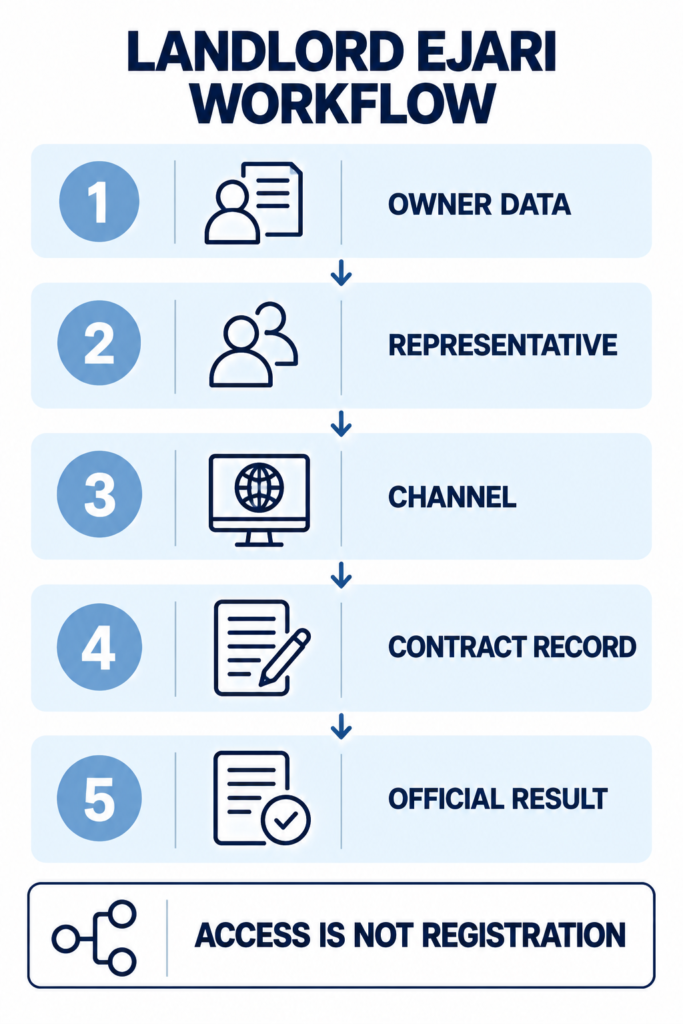
DLD’s FAQ discusses an owner outside the country using an appointed management-company representative or, where the owner’s DLD contact information is current, the Dubai REST route. Treat this as a route to verify, not a promise that every overseas owner can complete every request remotely.
| Checkpoint | Question | Evidence |
|---|---|---|
| Owner data | Are DLD email, mobile and identity records current? | Current profile or update confirmation |
| Representative | Is the management and POA authority sufficient? | Licence, POA and identity records |
| Channel | Will Dubai REST, Ejari system or Trustee process accept the case? | Current service terms or written confirmation |
| Result | Was the contract event actually registered? | Official certificate and status |
Frequently asked questions
Can only the landlord register Ejari?
No universal answer applies across every channel. DLD’s terms identify roles for the tenant, owner and official representatives. Check the selected channel and case.
Is an Ejari user account the same as a registered contract?
No. User registration establishes access or authority; the tenancy contract must still be registered or renewed through the applicable service.
Can an overseas landlord always approve through Dubai REST?
Do not assume so. The owner data, identity flow, property, applicant and current service conditions must support that route.
Organising a Dubai rental property?
DRI can help map the owner, property and operating evidence. Ejari access, contract registration and tenancy-law questions should be confirmed through the current DLD process and qualified advisers.
Official sources checked on 17 September 2026: Dubai Land Department Register/Renew Tenancy Contract service, Ejari user-registration service and DLD frequently asked questions. Channels, documents, fees and service terms can change; confirm the current case-specific requirements before applying.